# Feedback System

## Overview&#x20;

To build a good [Prompt Loop](https://docs.prst.ai/prompt-engineering/prompt-loop) process Prst.ai offers to use feedback system. each feedback is a unique set of ranking and user comment. These information can be used then by Prompt Engineers to improve prompt quality.&#x20;

<figure><img src="https://275285440-files.gitbook.io/~/files/v0/b/gitbook-x-prod.appspot.com/o/spaces%2FvFLnnH8i8v6480uxCfFP%2Fuploads%2FU2JJsssJeiWDzndLzxHN%2Fimage.png?alt=media&#x26;token=541f215e-4827-4ba1-b642-655cdfacec41" alt=""><figcaption></figcaption></figure>

To simplify comments analysis Prst.ai also offers sentimental analysis of the content and extra formula to recalculate ranking.&#x20;

## Feedback Component&#x20;

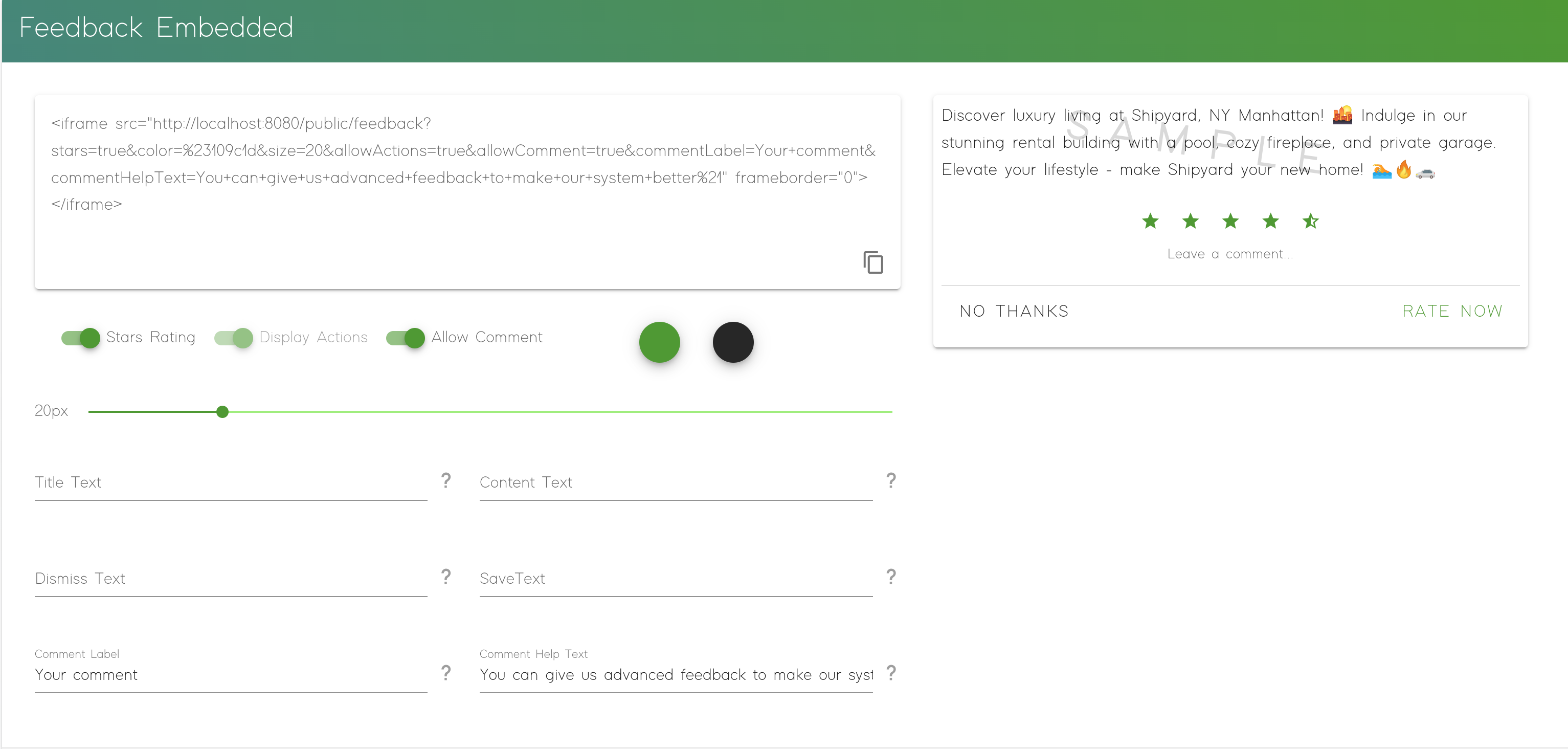
To make collect access easier we created a component that can be used inside `iFrame` on your websites or inside your internal tools.&#x20;

You can configure the component using your corporate style and wishes.&#x20;

<figure><img src="https://275285440-files.gitbook.io/~/files/v0/b/gitbook-x-prod.appspot.com/o/spaces%2FvFLnnH8i8v6480uxCfFP%2Fuploads%2FMCVdQ2qBOpkXklAe1qvA%2Fimage.png?alt=media&#x26;token=97cd2df7-0cac-41cf-b9e5-5e36cccdf559" alt=""><figcaption></figcaption></figure>

In addition to that it's also possible a way of how to collect feedbacks. Prst.ai allows you to select the measurement system for the feedback ranking. The following options are available: &#x20;

* **Like/Dislike**: only 2 dimensions where Like is good and Dislike is bad.
* **Ranking 5 stars: m**ore advanced with ability to select a exec value between 0 and 5.
* **Comments:** in addition to starts you can collect user feedback to understand result better.&#x20;

## Custom Component&#x20;

It's also possible to create a custom component  and [use API](https://docs.prst.ai/for-developers/api) instead of [pre-build one](#feedback-component) . In this case please make sure that the component will be able to collect information such as:&#x20;

<table><thead><tr><th width="189">Field</th><th width="386">Description</th><th>Note</th></tr></thead><tbody><tr><td>task_id</td><td>UUID of the task</td><td>not mandatory</td></tr><tr><td>user_id</td><td>ID of the user</td><td>not mandatory</td></tr><tr><td>prompt_id</td><td>ID of the Prompt</td><td>not mandatory</td></tr><tr><td>prompt_version</td><td>Exact version</td><td>not mandatory</td></tr><tr><td>prompt_version_id</td><td>Prompt Version ID</td><td>not mandatory</td></tr><tr><td>source</td><td>Extra field, useful for identifying source</td><td>not mandatory</td></tr></tbody></table>

> ❗️ **Note:**  All parameters are not mandatory, **however at least of of the following combinations must be provided** to do not lose your data:&#x20;
>
> * `prompt_id`
> * `prompt_id` **+** `prompt_version`&#x20;
> * `prompt_version_id`

For more information please refer to the [API section](https://docs.prst.ai/for-developers/api) or to [Swagger](https://api.prst.ai/docs) with up-to-date API schemes.&#x20;
